How to
Automate your trips
Start and stop trips automatically when your car's Bluetooth connects or disconnects, without ever opening the app.
1Watch the Start Trip setup
This video shows how to set up a Start Trip action in MacroDroid: the action type is set to Send Intent, target Broadcast, with the package name and intent action below.
2Values to enter
- Action: Send Intent
- Target: Broadcast Receiver
-
Package:
io.github.frankoprifti.drivetrack
For the intent action, use:
-
Start Trip:
io.github.frankoprifti.drivetrack.action.START_TRIP -
Stop Trip:
io.github.frankoprifti.drivetrack.action.STOP_TRIP
3Add the triggers
Set the trigger to Bluetooth connected to your car for Start Trip, and repeat the same steps with a Bluetooth disconnected trigger and the Stop Trip action to automate ending the trip. This works even while the phone is locked.
1See the DriveTrack Shortcuts actions
DriveTrack exposes two actions to the Shortcuts app: Start Trip and Stop Trip. This video shows where to find them.
2Create the automation
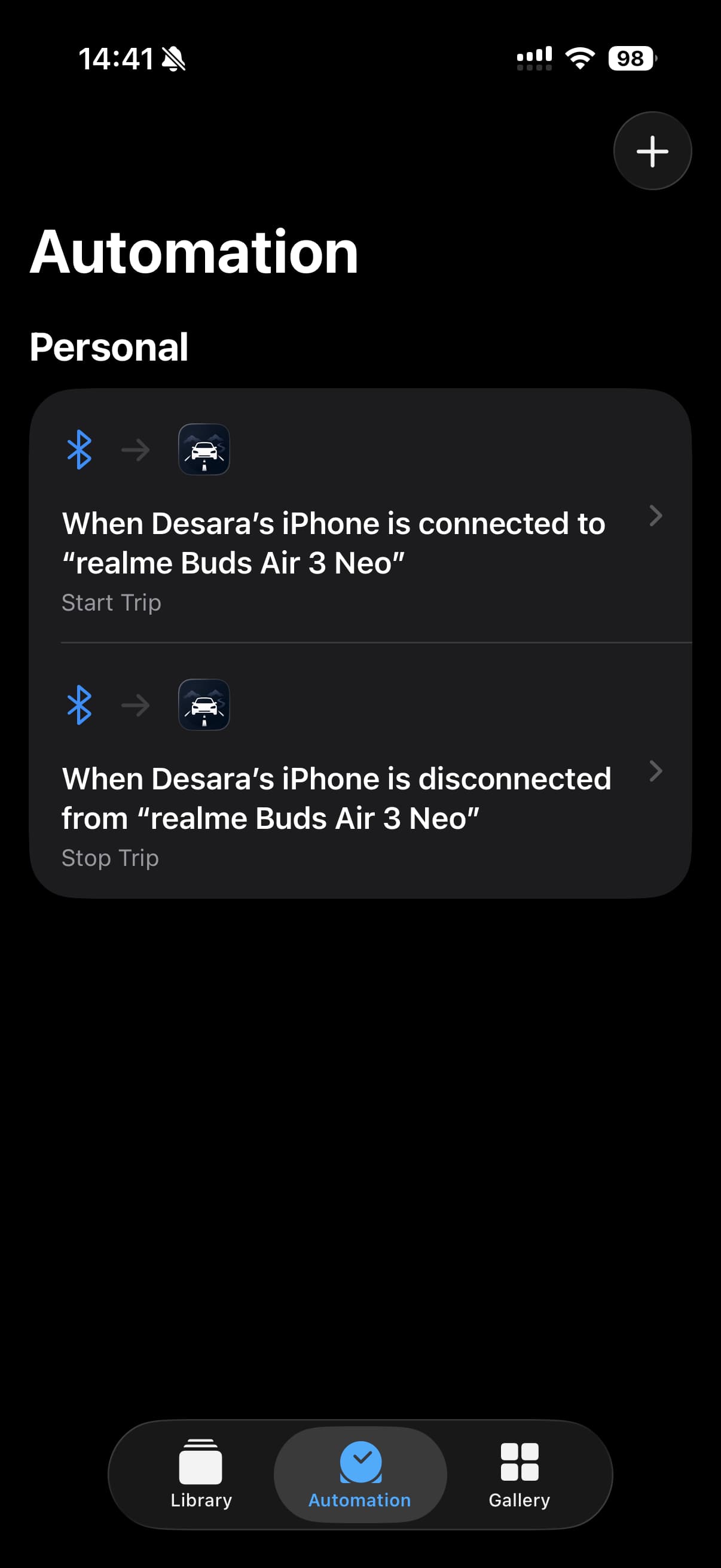
In the Shortcuts app, go to Automation → + and create two personal automations:
- When your iPhone connects to your car's Bluetooth, run Start Trip
- When your iPhone disconnects from your car's Bluetooth, run Stop Trip
Turn off "Ask Before Running" on both so they fire silently in the background.